
How to setup Partial Payments on preorders
EZ Preorder has a partial payments feature, that allows you to enable deposits on preorder products. This will allow you customers to pay only a specified amount upfront, and then the remainder on a specified date, usually when the item is expected to ship.
You can find the partial payments feature in the app by going to Configuration > Partial Payments > Configure.
Their are two types of partial payment options.
- Percentage deposit - With this option you can specify a percentage of the total product price that your customer will pay up front, with the remainder due on the specified date.
- Exact amount - With this option you can specify the exact amount the customer will have to pay upfront to purchase the preorder product
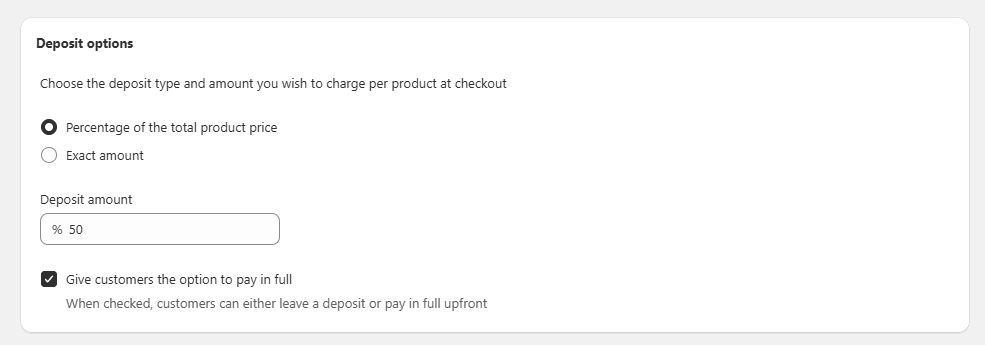
Once you have selected your deposit option, the next step is choosing the payment completion date. This is when the remainder of the payment will be automatically billed to the customers payment method. There are two options here as well.
- Specific date - You can choose a specific date when the customer will be charged. This works well for product releases, or when you know when your next restock is coming.
- Number of days after checkout - You choose a specific number of days after checkout the customer will be charged the remaining balance. This works well for made-to-order products where you have a consistent turnaround time.
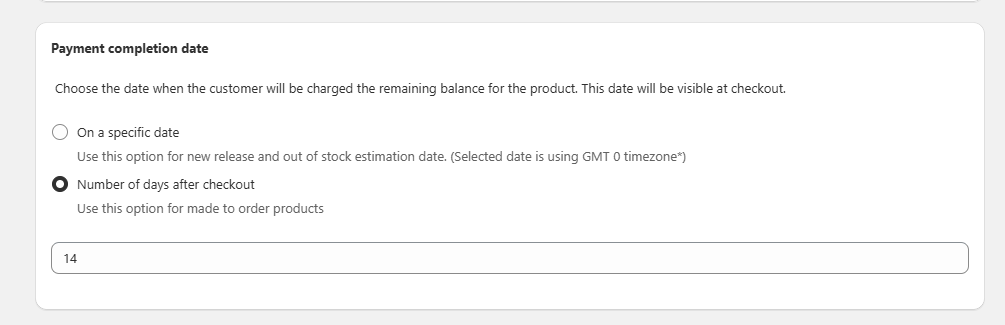
And that's all you need to setup partial payments. One thing to note is that enabling this feature will enable it on all of your preorder products.
See this video walkthrough for a visual guide: