
The preorder button is not displaying
If the preorder button is not displaying in your store, there are a few potential reasons that we will cover in this guide.
Double check settings
First, please double check to make sure the button is supposed to be showing based on the preorder setting that you have selected in the app. Meaning, if you selected "sold out" for example, please confirm that the product is actually sold out, or if you selected "Specific inventory level" please ensure the product actually has inventory. This is always the first thing to check.
Check your theme settings
If the preorder settings have been double checked and the button isn't being displayed when it should be, the next step is to check your theme settings. Open the app and go to Configuration > Theme settings > Select theme.
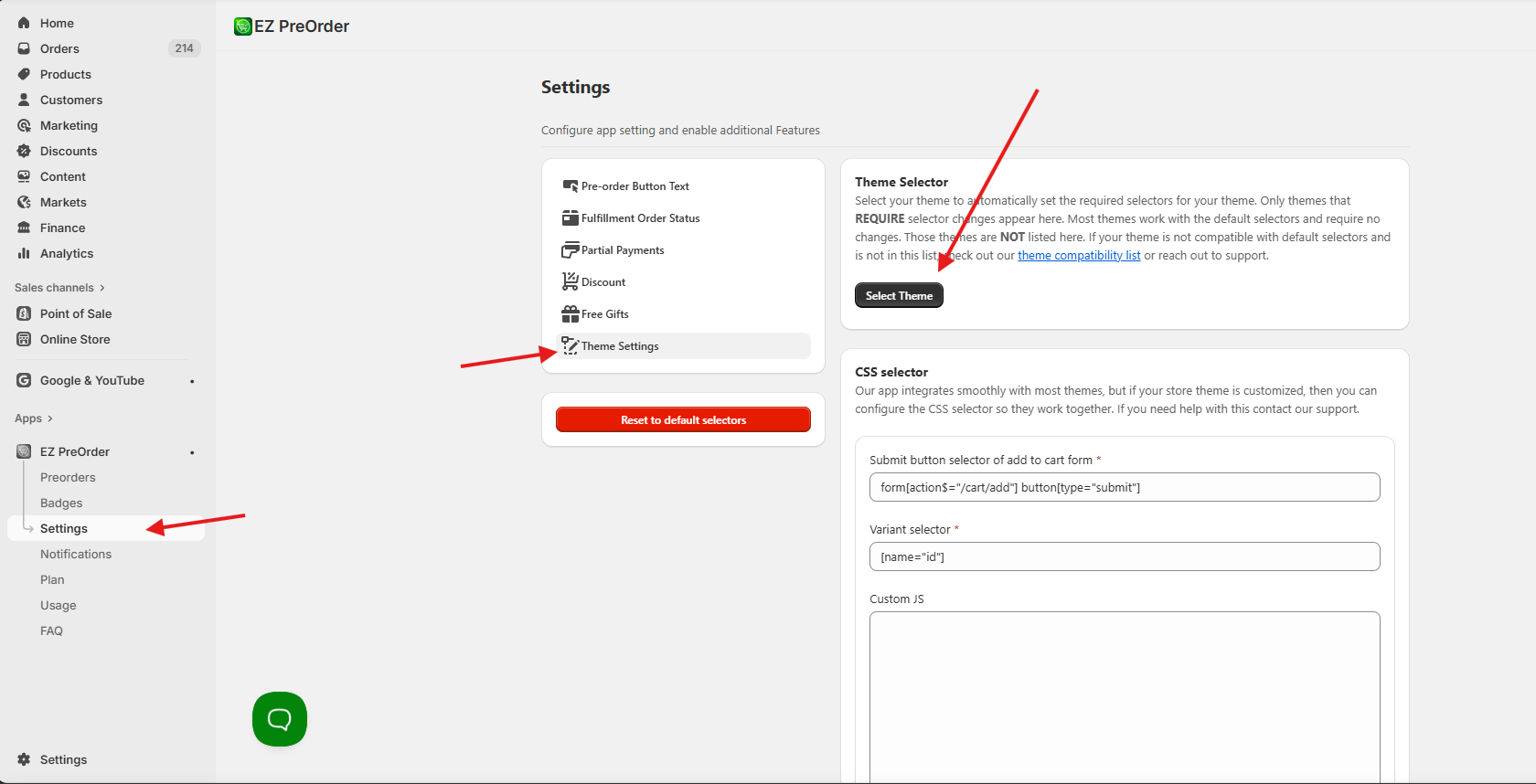
From here, see if your theme is listed in the options provided. If it is, select it, and your app setting will be changed to work with your theme.
Next steps
If you don't see your theme here, and the button isn't displayed when it should be in your storefront, then there are 3 possibilities.
- Another app/custom code/theme changes are interfering with the app. This is the most common cause, as other preorder apps, or apps that impact the product page, specifically product variants, can block our app from working. If you reach out to support, we can confirm if this is the case for you. And if it is, you can decide if you want to disable the app causing the issue.
- Your theme is a known incompatible theme. We only have a handful of themes that are known to be incompatible, but if your theme is one of them, then unfortunately the app will not be compatible unless you switch themes. You can see our theme compatibility list here. Look under "Known incompatible themes" and check for your theme.
- Your theme may be compatible but requires different theme settings, but we haven't tested it yet. If you have a theme that doesn't work with the default app settings, isn't on our select theme list in the app, and isn't on the known incompatible themes list, then we may not have tested with this theme yet. In this case, reach out to our support and we will test to see if the theme is compatible.
If you have any questions about setup or compatibility, please reach out to our support and we'll respond asap.