
How to enable the Direct To Checkout preorder button
EZ Preorder offers a Direct To Checkout feature for the preorder button on your product pages. This was designed to help boost conversions on your preorders. So instead of the preorder button adding the product to the cart like normal. The Direct To Checkout option will make the preorder button send the user directly to the checkout page with the selected preorder product added to the order.
This reduces the amount of steps your customer has to take in order to place their preorder. They can bypass the cart and go straight to the checkout. To enable this, you will first need to be on the Professional plan. Then you will navigate to Configuration > Direct To Checkout > Toggle On.
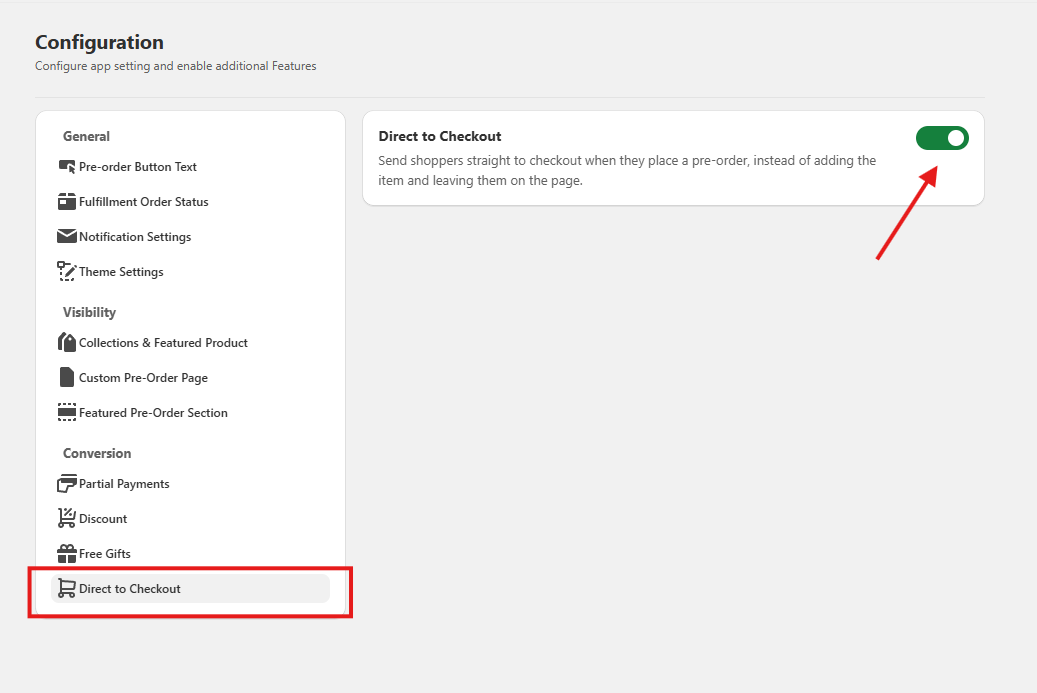
That's it! Now every preorder button in your store will direct straight to the checkout instead of just adding to cart. You can disable this again at any time.
If you have any questions please contact our support at support@casualecommerce.com.